
windows program shortcut keys in hindi : आर्टिकल में हम आपको shortcut तरीके से windows के किसी विशेष setting या एप्लीकेशन को ओपन करने के बारे में बताने वाले है। आपकी जानकारी के लिए बता दे कि Windows ऑपरेटिंग सिस्टम के Taskbaar में दिए गए search Box से आप अधिकतर setting और Application को ओपन कर सकते है। लेकिन कुछ सेटिंग या एप्लीकेशन को Taskbar से ओपन करना संभव नहीं होता है और इसके आलावा taskbar में दिए गए सर्च बॉक्स से सेटिंग या एप्लीकेशन को ओपन करने में एक लम्बे स्टेप्स को भी फॉलो करना पड़ता है।
यदि आप कंप्यूटर में एक्सपर्ट बनना चाहते है और दूसरों को अपने कंप्यूटर नॉलेज से इम्प्रेस करना चाहते है तो इसके लिए किसी प्रोग्राम को बेसिक तरीके से ओपन करने की बजाय shortcut तरीक से ओपन करना सबसे बेस्ट हो सकता है। जैसे की बहुत कम लोग जानते हैं कि आप Run Command Windows में Control टाइप करके आप सीधे control panel में पहुंच सकते हैं या Run Box में OSC टाइप करके सीधे Screen Keyboard ओपन कर सकते हैं। windows program shortcut keys in hindi आर्टिकल में हमने Windows 11 और Windows 10 में Run कमांड विंडोज से ओपन होने वाले सैकड़ो एप्लीकेशन और प्रोग्राम को Shortcut तरीके से ओपन करने के बारे में बताया है।
windows program shortcut keys in hindi
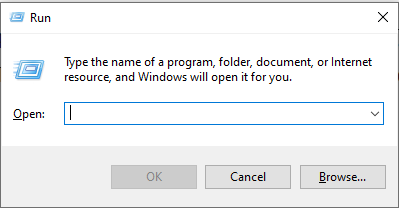
नीचे बताये गए किसी भी setting या application को shortcut तरीके से ओपन करने के लिए सबसे पहले आपको Run Command Window ओपन करना होगा उसके बाद आप रन में shortcut टाइप करके Setting या application को ओपन कर पाएंगे।
Windows Tools कुछ महत्वपूर्ण शॉर्टकट्स
Windows Tools माइक्रोसॉफ्ट ऑपरेटिंग सिस्टम की इनबिल्ड यूटिलिटी और एप्लीकेशन होते है। इन टूल्स का मुख्य उदेश्य यूजर को विंडोज आधारित कंप्यूटर में सिस्टम को सही से मैनेज और ऑप्टिमाइज़ करना होता है। नीचे आप कुछ सामान्य Windows Tools को देख सकते है।
| Program Name | Shortcut |
|---|---|
| On screen Keyboard | osk |
| Calculator | calc |
| WordPad | write |
| Windows Media Player | wmplayer |
| Windows Fax and Scan | wfs |
| Snipping Tools | snippingtool |
| Paint | mspaint |
| Notepad | notepad |
| Task manager | taskmgr |
| Sticky Notes | stikynot |
| Math Input Panel | mip |
| Command Prompt | cmd |
| Powershell | powershell |
| Windows Journal | journal |
| Narrator | narrator |
| Magnifier | magnify |
| Edge | microsoft-edge:// |
| Internet Explorer | iexplore |
| Bluetooth | fsquirt |
| Windows Firewall | firewall.cpl |
| Windows Firewall with Advanced Security | wf.msc |
| Windows Explorer | explorer |
| XPS Viewer | xpsrchvw |
Windows 10/11 Specific utilities
“विंडो स्पेसिफिक यूटिलिटी आमतौर पर सॉफ़्टवेयर एप्लिकेशन और टूल को संदर्भित करती हैं जो विशेष रूप से Microsoft Windows ऑपरेटिंग सिस्टम के लिए डिज़ाइन किए गए हैं। इन यूटिलिटीस का मुख्य कार्य विंडोज़ की कार्यक्षमता को बढ़ाना होता है और इन्हे डेवलप करने का कार्य माइक्रोसॉफ्ट टीम या थर्ड पार्टी टीम करती है।
| Name Of Program | Shortcut |
|---|---|
| Scheduled Tasks | control schedtasks |
| Administrative Tools | control admintools |
| Windows Update settings | control update |
| Directly go to list of installed programs | appwiz.cpl |
| Local Security Policy | secpol.msc |
| Know current Windows version | winver |
| Mouse settings | main.cpl |
| Certificates | certmgr.msc |
| Services | services.msc |
| Remote Desktop Connection | mstsc |
| Event Viewer | eventvwr.msc |
| Color Management | colorcpl |
| Screen Resolution | desk.cpl |
| Time and Date | timedate.cpl |
| Advanced User Accounts | netplwiz |
| Create a shared folder wizard | shrpubw |
| Backup and restore user name and passwords | credwiz |
| Local Users and Groups | lusrmgr.msc |
| Sound settings | mmsys.cpl |
| Region and Language | intl.cpl |
| Resource Monitor | resmon |
| Registry Editor | regedit |
| Local Group Policy Editor | gpedit.msc |
| Shared Folders | fsmgmt.msc |
| Computer Management | compmgmt.msc |
| Device Manager | devmgmt.msc |
| Malicious Software Removal Tool | mrt |
| Problem Steps Recorder | psr |
| Internet Options | inetcpl.cpl |
| Disk Management | diskmgmt.msc |
| Disk Defragmenter | dfrgui |
| Disk Cleanup | cleanmgr |
| System Configuration | msconfig |
| Network Connections | ncpa.cpl |
| All System information | msinfo32 |
| System Restore | rstrui |
| Windows Task scheduler | taskschd.msc |
| User Account Control Settings | useraccountcontrolsettings |
| Open Ease of Access centre | utilman |
| To add a New Device | devicepairingwizard |
| To Connect to a Projector | displayswitch |
| To Open Recently Viewed files | recent |
| Remote Assistance | msra |
| Backup and Restore | sdclt |
| Folder options | control.exe folders |
| Create Repair Disc | recdisc |
Control Panel Run Commands
कंट्रोल पैनल रन कमांड, जिन्हें अक्सर कंट्रोल पैनल applets या कंट्रोल पैनल शॉर्टकट के नाम से भी जाना जाता है। ये कुछ स्पेसिफिक कमांड होते हैं जिनका उपयोग आप विंडोज कंट्रोल पैनल में विभिन्न सेटिंग्स और टूल तक shortcut तरीक से पहुंचने के लिए इस्तेमाल कर सकते हैं। इन कमांड्स को Windows Run Windows या कमांड Prompt के माध्यम से एक्सेक्यूट किया जाता है, जिससे विंडोज यूजर कण्ट्रोल पैनल में न जाकर विंडोज सेटिंग को नेविगेट कर सकता है।
| Name Of Program | Shortcut |
|---|---|
| Control Panel | control |
| System Properties | sysdm.cpl |
| Personalization & Themes | control desktop |
| Personalization & Color | control color |
| Regional and Language Options | intl.cpl |
| File explorer properties | control folders |
| Keyboard Properties | control keyboard |
| Programs and Features | appwiz.cpl |
| Mouse Properties | control mouse |
| Network Properties | control netconnections |
| Printers Properties | control printers |
| Manage current user Account | control userpasswords |
| Manager all User Accounts | control userpasswords2 |
| Date and Time | timedate.cpl |
| Folder Options | inetcpl.cpl |
| Power Options | powercfg.cpl |
| Sound control panel | control mmsys.cpl sounds |
| Internet Options: | inetcpl.cpl |
Open Folder Commands
कंप्यूटर में विंडोज ऑपरेटिंग सिस्टम इनस्टॉल के समय यूजर की मदद के लिए सिस्टम में कुछ स्पेसिफिक फोल्डर बन जाते है जैसे की Video , Document , favorites , pictures आदि। सिस्टम इन फोल्डर का उपयोग इंटरनेट से डाटा डाउनलोड करने के बाद फॉर्मेट के अनुसार डाटा स्टोर करने के लिए करता है। यदि आपको इन फोल्डर का अक्सर उपयोग लगता है तो फोल्डर में जाने के लिए लम्बे प्रोसेस को फॉलो करने की जगह शॉर्टकट तरीका अपना सकते है।
| Name Of Program | Shortcut |
|---|---|
| Open Documents Folder | documents |
| Open Videos folder | videos |
| Open Downloads Folder | downloads |
| Open Favorites Folder | favorites |
| Open Recent Folder | recent |
| Open Pictures Folder | pictures |
System Run commands
सिस्टम रन कमांड्स” स्पेसिफिक कमांड या शॉर्टकट होते हैं जिनका उपयोग विंडोज रन डायलॉग या कमांड प्रॉम्प्ट के माध्यम से विभिन्न Syste Tools , Settings और Utility को शॉर्टकट तरीके से एक्सेस करने के लिए किया जाता है । ये कमांड आपके विंडोज ऑपरेटिंग को विभिन्न प्रकार से मैनेज और कॉन्फ़िगर करने के लिए इस्तेमाल किया जाता है ।
| Name Of Program | Shortcut |
|---|---|
| System Configuration | msconfig |
| System Configuration Editor | sysedit |
| System Information | msinfo32 |
| Group Policy Editor | gpedit.msc |
| Local Users and Groups | lusrmgr.msc |
| Computer Management | compmgmt.msc |
| Windows Firewall | firewall.cpl |
| Registry Editor | regedit |
| Task Scheduler | taskschd.msc |
| Windows Update | wuapp |
| Performance Monitor | perfmon.msc |
| System Properties | sysdm.cpl |
| Disk Cleanup | cleanmgr |
| System Configuration | msconfig |
| System Restore | rstrui |
All other useful run Command shortcuts
नीचे आप माइक्रोसॉफ्ट ऑपरेटिंग सिस्टम में उपयोग होने वाले कुछ अन्य और समान्य प्रोग्राम और सेटिंग को ओपन करने का शॉर्टकट तरीका जान सकते है।
| Name Of Program | Shortcut |
|---|---|
| Windows DVD Maker | dvdmaker |
| WMI Management | wmimgmt.msc |
| Performance Monitor | perfmon.msc |
| Microsoft Support Diagnostic Tool | msdt |
| Microsoft Management Console | mmc |
| Display Color Calibration | dccw |
| Language Pack Installer | lpksetup |
| Getting Started | gettingstarted |
| Game Controllers | joy.cpl |
| File Signature Verification | sigverif |
| Driver Verifier Manager | verifier |
| Display Switch | displayswitch |
| Display | dpiscaling |
उम्मीद करते है की windows program shortcut keys in hindi आर्टिकल में बताई जाने वाली जानकारी आपके कंप्यूटर नॉलेज को बढ़ाने और कंप्यूटर को ऑपरेट करने के स्पीड को बढ़ाने में मदद करेगी। किसी तरह के सवाल डाउट के लिए कमेंट के माध्यम से हमें संपर्क कर सकते है।
सम्बंधित जानकारी
- Guest Account क्या है और विंडोज़ 10 में गेस्ट अकाउंट कैसे बनाये

- Dektop Kya Hai ? डेस्कटॉप के प्रमुख कार्य
- Batch File क्या है ? बैच फाइल के उपयोग और कैसे चलाए
- Computer में New Drive Create और Format कैसे बनाये
- पीडीएफ क्या है? कम्प्यूटर से PDF File कैसे बनाये।
- ऑपरेटिंग सिस्टम में Virtual Memory क्या है ? फ़ायदे , नुक़सान और कैसे कार्य करता है


